
Discovery is perhaps the most critical part of a process improvement project because when done well, it establishes a solid foundation for subsequent analysis and design. Before you can arrive at a solution, you have to identify and articulate the actual problem. In this effort to diagnose and recommend solutions for a broken IT Incident Reporting process, I facilitated a Design Thinking workshop and subsequent process analysis to identify the root cause of the problem and obtain approval and funding for the follow-up implementation project.
The IT Help Desk was plagued by bad reviews and constant complaints. System outages and problems would get reported, a support ticket generated and escalated to the proper group, but then . . . silence. Communication around expected resolution time was often nonexistent, meaning work wasn't getting done. The situation was sapping confidence and creating business uncertainty around the enterprise. No one in the organization could put a finger on the source of the problem. Analysis of the various activities that contribute to the overall process showed that everything was functioning technically correct, but end user needs were not being met.
I facilitated a Design Thinking workshop that IT management commissioned to get representatives from various stakeholder groups in the room at the same time to figure out where the disconnect was occurring. After warmup exercises to get the participants focused on the user and also to loosen up everyone's creative thinking, the group moved into the core exercises of problem definition. First, they created a lightweight user persona around which to anchor subsequent discussion, then broke into breakout groups to map out the current incident reporting process as they understood it, capturing each step on Post-Its.
Once the breakout groups finished, we brought them back together and had them post their output into a single combined process flow on the conference room wall and discuss what they saw. After a bit of cleanup and organizing—removing duplicates and clustering items for clarity, the group immediately noticed a few significant patterns and added notes about them to the wall. The session was wrapping up at this point, so I took photos of the wall for reference during subsequent analysis.
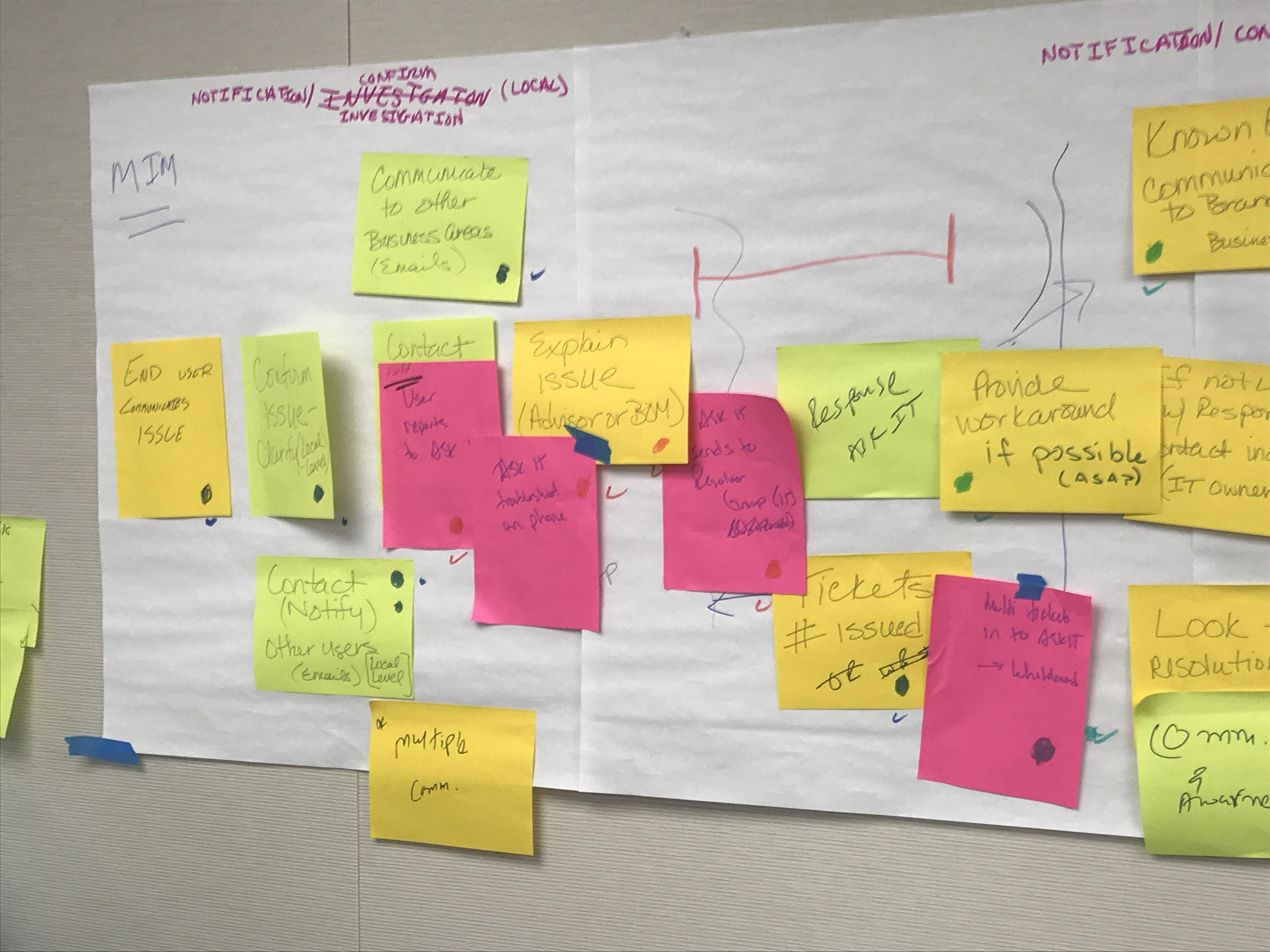
Workshop wall. This was the process flow after removing duplicates and grouping items into roughly the correct order.
Back at my desk, I took the photos from the workshop and formally mapped them out using BPMN modeling software to organize all the actions, roles, decision points, and handoffs captured in the workshop. Once I had the model finished, I reviewed it with a select group of the participants to verify its accuracy and talk through what we had found.
The main thing that stuck out, which had been commented on even during the workshop once the overall flow began to take shape, was the wait period that was occurring once IT had sent out notification and begun work on the resolution. This seemed to be the source of the disconnect, since it turned out that each of the various IT system owner groups had different communication procedures, resulting in tickets being left open and critical communications windows being missed.
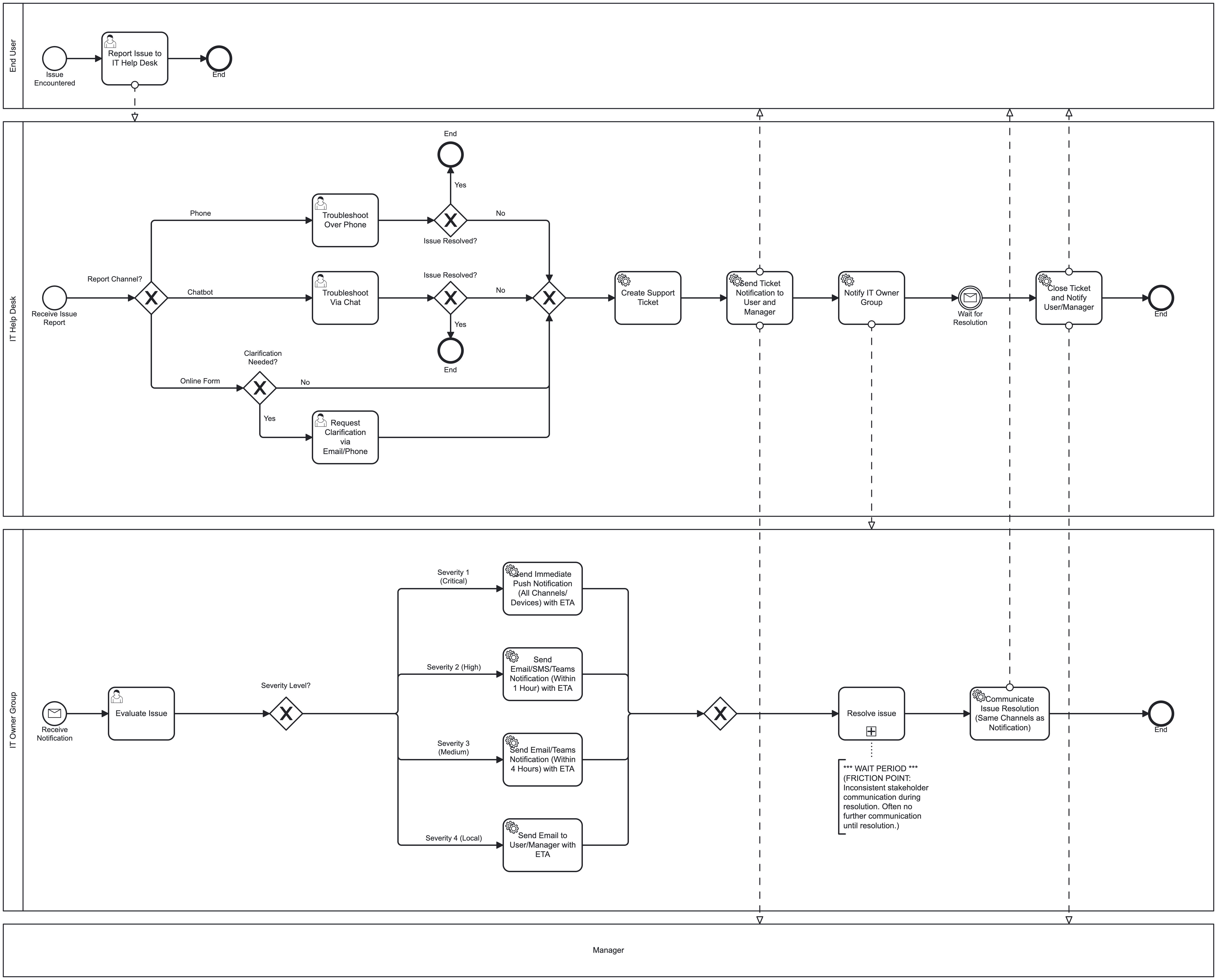
The detailed process flow rendered in BPMN notation.
With the critical friction point identified, I then prepared a high-level version of the process to present to executive leadership. I surfaced the strategic insights for executives to understand the flow and where it breaks down, giving visual emphasis to the problematic wait period and the key findings. The annotations framed the issue in business terms rather than the more technical terms used by most of the workshop participants. The recommendation to implement standardized progress updates was accepted and project budget approved.

Annotated executive summary version of the process.
